How ConvertKit Can Help You Grow Your Email Marketing List

What is the best email marketing tool out there for small businesses and start-ups?

Right now there are dozens of email marketing tools in existence.

If you are looking for a way to grow your email marketing list, ConvertKit may be what you have been looking for all along.

Whether you are a creator with a following, an email marketer, or run an e-commerce store, ConvertKit has you covered.

ConvertKit is a powerful email marketing software that can help you grow your list and improve your conversions.

In this blog post, we will discuss and answer several key questions that many business owners have before investing in this type of software such as:

-What is email marketing?

-What are the benefits of email marketing?

-What do good email marketing campaigns look like?

-What types of businesses can benefit from using email marketing?

-What are the different pricing tiers for ConvertKit?

There are so many more that we could add to the list, but let’s hop in and cover the ones that are provided to get you the best sense of what email marketing can do for your business!

What is email marketing?

Email marketing is a form of digital marketing that uses email to promote products or services.

It is a cost-effective way to reach out to your target audience and can result in increased sales and conversions.

It is arguably the best form of marketing at the time of this writing in terms of an ROI perspective and overall control of your customer messaging.

There are many good email marketing platforms out there.

Email marketing software is wildly lucrative for your company if you know what you are doing.

Most email marketing software companies out there provide great value and a decent price and many even offer a free plan to get started.

Every company charges for its services per month, so rest assured you can get immediate value right from the start.

Let’s move on to the features and benefits of email marketing.

What are the benefits of email marketing?

The benefits of email marketing are vast. When done correctly, email marketing can help you increase brand awareness, drive traffic to your website, improve customer loyalty, and boost your bottom line.

In fact, according to a study by the Direct Marketing Association, email marketers saw an average return on investment (ROI) of $44 for every dollar spent.

As time goes on with email marketing, your investment in time and monetary resources only gets better.

Through A/B testing, a larger database of customer emails, and constant contact, the return from your customers will continue to compound.

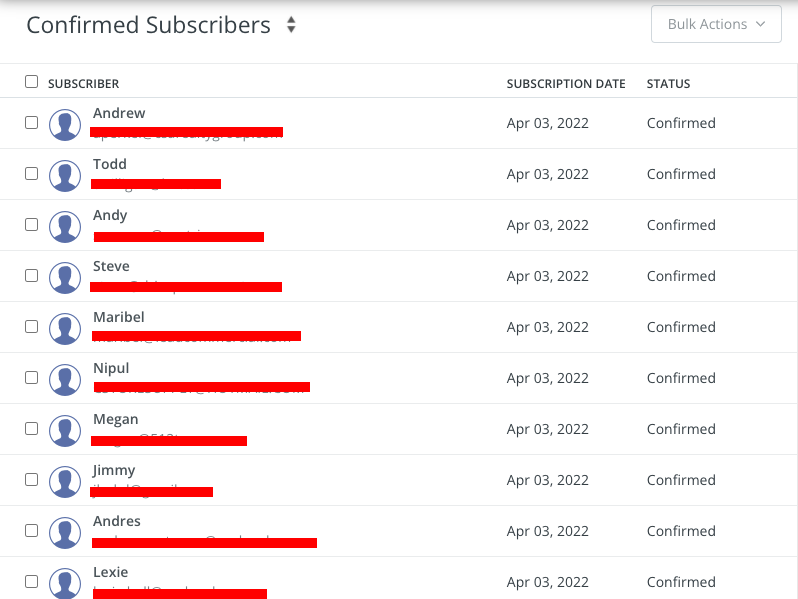
If you are capturing your customer’s information effectively on your sign-up forms, your overall number of subscribers will continue to grow and continue to fuel your email marketing services effort.

The best part about email marketing is the marketing automation pieces. Below you will see how this entire process can be done by marketing automation.

What do good email marketing campaigns look like?

Here is an ideal flow of a website visitor into an email subscriber.

Website visitor -> landing page -> sign up forms -> Added to your list -> placed into A B testing emails -> Sold e commerce items or course -> constant contact emails -> Endless buying cycle.

Now that you know what the flow of a website visitor looks like from a 30,000 foot view, let’s talk about how you should think about these in terms of their maximum impact on a customer.

Great email marketing campaigns design a cohesive story around a product or service that flows from one email to the next.

These emails keep the prospective buyer interested in what you have to offer and help entice them into buying.

They generally look and act like a casual conversation with your customers and not a sales pitch.

A great way to judge the email you are writing is by basing its effectiveness on whether it is something that your customer would be excited to open and read in their inbox.

Marketing campaigns should always have clear and concise goals. At the end of the day, your email marketing efforts should be driving meaningful value to your company or brand in the form of monetary value or brand equity.

Creating a campaign like this takes time and effort. It’s not something you can slap together in a few minutes.

Before you pull the trigger on any email marketing software, let me try and make the case to start with software such as ConvertKit.

We have been using this email marketing service for over two years now and we are very happy with our email campaigns and performance.

In terms of lead generation, we have sent endless amounts of emails to our customers that have resulted in thousands of dollars per month.

While on their free trial we initially did an email campaign with our existing customers. Over the next five days, we did a marketing push to get as many 5-star reviews as we could.

In that time frame, we were able to get over 75 – 5 star reviews on Google That was massive value for us as a small business in terms of SEO value and ranking in Google for search.

What types of businesses can benefit from using email marketing?

ConvertKit is best for businesses that want to grow their email marketing list and improve their conversions. It is also a great choice for businesses that want to create automated sequences, tags, and broadcasts.

For that reason, that is pretty much any business that wants to utilize email marketing software to grow their customer base and monetize their subscribers.

If you own any of the following businesses, you should consider email marketing software:

Bloggers and content sites, service-based businesses, newsletters, real estate, e-commerce restaurants, churches, non-profits, etc.

If you are not utilizing email marketing software you are simply missing out on a huge stream of revenue for your business.

Let’s talk about the different features and benefits that an email marketing service such as ConvertKit has to offer.

What are the Benefits and Features of ConvertKit?

There are endless features that ConvertKit has to offer within its email marketing service. Let’s start with the first – Bulk Subscriber upload.

Bulk subscriber upload: If you have an existing list of customers on a CSV form, you can instantly upload these customers into ConvertKit.

Landing Page Creation & Sign up forms: ConvertKit will host any landing pages and sign up forms that you will need to communicate with your web visitors and potential customers.

Saved Email Templates: Instantly create, store, and email out your customers from inside your dashboard.

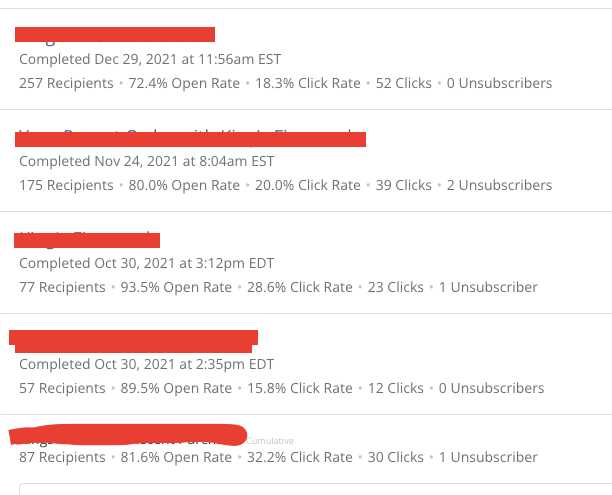
Campaign Monitor: Easily see your past campaigns and the associated metrics for each one. These were highly-targeted segmented emails sent out to our list. Hence the higher open rates.
Email Sequences: Send out a chain of value emails to get your customers engaged and interesting in buying what you have to offer.

This is done best if you can add a sense of urgency hidden within the email. Remember not to be spammy when writing these.

What are the different pricing tiers for ConvertKit?

The best part is how much value you get from ConvertKit. On top of that, it is extremely affordable for small businesses and start-ups. There are three pricing tiers:

– $29/month for up to 1000 subscribers

– $79/month for up to 3000 subscribers

– $379/month for up to 10000 subscribers

Conclusion:

If you are wanting to utilize email marketing to scale up your revenue and your customer base, you can sleep on email marketing software and the associated email marketing tools that come with it.

Marketing automation for any sized business is essential. Almost every email marketing service offers a free trial, so there are absolutely no excuses not to get started!

The Best 15 CRMs for small businesses.

CRMS are crucial for businesses of all shapes and sizes. A CRM helps you find new customers, win their business, and keep them happy by organizing customer and prospect information in a way that helps you build stronger relationships with them and grow your business faster.

Businesses that choose not to use a CRM or simply push off using one can suffer from a lack of efficiency and increased profitability.

When your business is financially ready to use a CRM you need to jump on board with one ASAP so that you can start to benefit from day one.

CRMs come in all shapes and sizes, so the best way to find the CRM that’s right for your business is by doing your research.

Here is a list of the best 15 CRMs that could be perfect for your business!

1) Monday.com CRM: is ideal for small businesses that want to manage and track their leads. It’s also great for businesses who want to collaborate with their team on projects in real-time.

Monday CRM is cloud-based, so it’s easy to access from anywhere. It also integrates with other popular applications, such as Google Apps and Salesforce.com.

You can check out this CRM here.

***Monday.com is our pick (and what we are currently using)****

2) Zoho CRM: One of the least expensive CRMs on the market today, if you’re looking for a CRM to use as your very basic contact management tool, this might be a good choice.

It’s also a good choice for companies that want a CRM but don’t have or need much in way of customer relationship management features – think just simple lead tracking and pipeline analysis.

3) Pipedrive CRM: Manage leads as your business grows, jump on deals at the right time and nurture long-term relationships.

Pipedrive’s CRM for small businesses gives you back valuable time by centralizing multi-channel data and automating tedious processes.

4) HubSpot CRM: HubSpot CRM is part CRM, part marketing campaign management tool. It can help you keep track of customers as well as leads, but the CRM side of things doesn’t offer all of the bells and whistles found in other CRMs on this list.

For example, it can’t track deals or tasks, so you’ll have to look elsewhere if those are important to you.

You can check out this CRM here.

5) Woopra: This CRM is best suited for users who want an app for analytics more than anything.

It’ll give you detailed reports on who your leads are, how they interact with your website, and what pages they visit most – but it won’t help you keep track of customer service issues or organize customer data.

6) Batchbook CRM: Batchbook CRM is an easy-to-use CRM for small businesses that want to get rid of their spreadsheets once and for all.

The downside? The CRM features in Batchbook might not be robust enough to make this CRM a good fit for larger businesses, so you will have to make a switch down the road.

7) Highrise CRM: Highrise CRMs come in two flavors – one is affordable, while the other costs are quite a bit more (but comes with some major CRM features like activity-based sales reports and customer satisfaction surveys).

Both CRMs come with a slew of CRM features, making this CRM great for companies managing large amounts of clients.

8) Zendesk: If you run an e-commerce site or any type of online business that deals with customers, chances are good that your company will be using at least one app within the Zendesk family.

The CRM, which can help your small business keep track of customers both on and offline, is quite possibly one of the simplest CRMs to use on this list; if you’re looking for a CRM but don’t have time to become an expert in complicated software, give Zendesk CRM a try.

9) Fresh Sales: Freshsales (formerly Freshworks CRM) is a full-fledged sales force automation solution for sales teams, making it easy to track pipelines and manage individual accounts.

Freshsales supports up to 5,000 users so you won’t need to worry about another solution for quite some time.

Whats neat about fresh sales is that it uses the power of artificial intelligence (AI) to help users do more with fewer internal resources.

The CRM also facilitates easy tracking of deal progress throughout the pipeline. Simply by dragging and dropping, users can move a lead stage from new through to contacted and qualified, for instance. 

10) Right Now: This highly customizable CRM can help you manage your contacts, automate tasks, and gain insights into what works best when building relationships with customers.

It also comes in three different price options depending on what features you most.

11) Marketo CRM: Marketo may be a CRM, but it’s also an award-winning marketing automation platform.

Similar to the HubSpot CRM, the features in this CRM might not be enough to help you organize your customer interactions – think things like lead generation and customer service.

However, it can keep track of all of your contacts while you focus on building your business.

12) Insightly: A no-nonsense CRM for small businesses that want to get rid of their spreadsheets once and for all, Insightly is affordable while boasting several CRM features including activity feeds that help you manage to up-sell campaigns.

The downside? It doesn’t have enough CRM features to serve larger businesses well.

13) Sugar CRM: Sugar CRMs’ simplicity makes it perfect for small businesses with limited tech skills. If you’re willing to pay $25 per user per month (or $150 per user annually), you’ll get quite a few CRM features with this CRM (including sales forecasting and campaign management).

Sugar is easy to use and won’t cost an arm and a leg (depending on which plan you go with).

But like Zoho CRM, it’s easy to use but lacks some CRM features -– things like sales forecasting and customer service automation — that might make this CRM a better fit for larger businesses.

14) Nimble: Nimble CRM is one of the most affordable CRMs on this list; plus, it comes with some basic CRM features like lead scoring and social media integration.

It’s great for small businesses looking to organize their customer interactions using an intuitive web app.

15) Sales Force: One of the most popular CRMs on the market today, Salesforce can connect to other apps like Google Analytics or QuickBooks Online to give small companies an enterprise-level toolset without having to shell out big bucks.

The downside?

It’s a pretty complicated CRM, so not the best option for companies that don’t have a dedicated CRM expert to run it.

Conclusion:

CRMs are essential tools for businesses of all sizes. They help you find new customers, keep track of customer interactions and data, and automate tasks to make your life easier.

CRMs come in all shapes and sizes so it’s important to do your research before deciding which CRM is the best fit for your business. In this article, we’ve outlined the 15 CRMs that will be perfect for any small business!

14 Ways to Grow Your Email List

There are many ways people can grow their email list. One of the most effective is to have a clear, concise call to action on every single page of your website.

Many brands don’t realize that this is one of the easiest and cheapest ways to grow your list!

If you’re a blogger, it is great to have a pop up email capture window and you might also want to include a sign-up form in the sidebar of your blog.

To make it as easy as possible for people to subscribe, make sure you only ask them for their email address and nothing else.

The whole key here is to remove any type of friction possible. You just want to get your foot in the door with the visitor. Once you get their email address you can always grow the relationship deeper later on.

If a visitor comes to your site and then promptly leaves, the chances are you will never see that person again.

You should also be creative with how you invite people to subscribe. If you actually want to get email subscribers, you need to peak peoples attention and provide immediately curiosity or perceived value for the potential reader.

Here is a good example and a bad example.

Bad: “Hit the subscribe button to receive our newsletter” (BORING!).

Better: “Smash the subscribe button to get immediate money-making tips for your business.” (There is an actual reason for the reader to subscribe).

Before you want start going your email list you need to get the system in place that will capture your traffic coming to your site.

I highly recommend using something like Opt-in Monster to capture visitors and convert them to email subscribers.

The importance of email list

One of the most important aspects of any business is communicating with your customers.

The easiest way to do this is through email marketing. But what’s the point if you don’t have an email list to send messages to?

Communicating with your customer base is crucial for any company that wants to succeed in today’s market, but building an email list can be difficult and time-consuming. Luckily, you can take steps to grow your email list fast.

Continue reading to learn how!

1. Clear and concise call to action on every page

Having a clear, concise call to action on every page of your website is one of the most effective ways to grow your email list.

As you know, there are many reasons why people aren’t subscribing to your list.

One reason might be because they don’t see it anywhere. That’s why it’s essential to have a clear and concise call to action on every page of your site so that visitors can subscribe whenever they want.

It doesn’t even have to be in the form of a sign-up form; it could just be an easy link with text like “Subscribe” that can open a new landing page.

Get creative and make it a no-brainer to want to subscribe to your list.

2. Bloggers should include a sign-up form in the sidebar

As mentioned, if you’re a blogger, it’s essential to have a sign-up form in your blog’s sidebar. This way, when people are reading any of your blog posts, they can easily subscribe to your list without much effort.

Another idea is to create an eBook or webinar that includes an opt-in offer.

You might want to offer something like a free download of an eBook that provides insider tips on the topic or a free webinar where they can learn more about the topic from you.

To get someone’s email address after they’ve downloaded something from you, have them enter their email address on the thank-you page, and voila! They’re on your list.

3. Including a subscribe button at the end of blog posts

If you’re a blogger, one of the easiest ways to grow your list is by including a subscribe button at the end of your blog posts.

Whenever someone finishes reading your post, they should easily subscribe to your blog. This is also an easy way for people who want to know more about your business without clicking through to another page.

4. Including an email list box at the top of pages

Include a sign-up box at the top of your page so people can subscribe right away. This will allow a person to subscribe before they even read your content.

5. Including an email list box at the bottom of pages

If you’re an online business and you want to grow your email list, you can include a box at the bottom of every page on your site that asks people to subscribe. The box should be straightforward and should only ask for an email address.

6. Offer an Incentive to sign up

You can offer a free download or another incentive in exchange for an email address and then use the contact information you gather to promote future content.

Consider using this to grow your email list. It’s also important to collect emails and make sure that people opt in because there is no point in building up an extensive list of contacts who may never open any messages from you.

Free ebook down loads or a PDF of useful tips tend to work very well for this.

7. Use Social Media

The more followers you have, the easier it is to convert them into email subscribers. You can use social media platforms such as Instagram and Facebook to grow your following base.

Post a link in the caption of an Instagram story or post with a call-to-action that tells people how many new emails they’ll receive for signing up for your company’s mailing list.

Also convey to them what the value will be by doing so. Are there any success stories from your readers or video reviews you could use?

Another way you could increase engagement on these channels is by posting content that will resonate with this audience while still providing some value to those who are already following along on social media accounts like Twitter and LinkedIn.

8. Turn any press mentions into an opportunity to grow your email list

One of the best ways to grow your email list is by using press coverage. If you have been mentioned in a local paper, blog post, or other media outlet, then this can be used as an opportunity to add new subscribers and followers to that article.

You should include links at the bottom of any articles about your business so people who might not know much about it will learn more and potentially subscribe for updates on what’s happening with you.

This also helps build credibility because they’ll see how many others are following along, and if there are comments left below, these could even provide some great ideas for future content!

In addition, think about how bad you would feel if someone blogged and linked to your site that had a huge following and you ended up having nothing in place to capture some of these visitors – ouch!

9. Include customer reviews on your sign-up landing pages

Reviews can be a powerful tool for increasing conversion rates on your website. Reviews provide social proof that others have had positive experiences with your company and products, making potential customers feel more confident about their purchase decision.

This is especially important when it comes to an email subscription. Consumers likely will want to learn more if they believe others had a positive experience with your company.

Consider placing an area to subscribe to your email list below the positive reviews.

10. Create a blog that users can subscribe to

A compelling blog can be a great way to draw in interest and allow people the chance to subscribe.

There are many ways you could do this, such as through social media, email marketing, or even just by word of mouth.

If your company is new and has not been around for long, it might make sense to start with an introduction post that tells potential customers what they offer and why their product or service would benefit them.

You should also include some pictures, so readers get a better idea of who you are!

11. Post about your newsletter

You can also post your email newsletter to social media to generate more subscribers.

This is an excellent way to drum up interest for people who are not yet subscribed to your email list but are looking for the next step in the relationship.

You can do this by posting links or images that link back into your blog posts with the title of the article and an excerpt from it. For example: “Click here if you want learn more about ____”.

12. Promote content that requires users to subscribe to view

Another great way to get more email subscribers is to generate content that you can only view via your emails.

You can use this technique by creating content that includes videos or images that will not be available anywhere else on the internet.

This type of exclusive content encourages people who would never sign up for something online to sign up so that they can see what’s going on with your business.

13. Give Away Useful Products or Services

One of the best ways to gain email subscribers is by giving away products or services that your audience will find helpful.

You can set up a competition with prizes to gain more readers. You can also offer free consultations for your skills.

Giving away these types of helpful products or services will make people want to sign up for your email list because they know they’ll be getting something out of it!

14. Paid Services or Classes.

Paid services or classes are a great way to gain email subscribers for your blog. Paid services and classes give potential customers a better understanding of what your business offers and can even provide a free trial to help them decide if they want to use the service or purchase the product.

During the free trial part you want them to be flooded with value so that they see the immediate value in your product or service.

The best part is that you don’t need to worry about customer acquisition costs because you’re paying for them yourself.

Conclusion

Marketing for your company or organization can be challenging when you start. Still, by being proactive and creating many ways for consumers to subscribe to your email list, you set your business up for long-term success.

Apply these tips to grow your email list and watch your company expand!

Happy Hunting!

Want more in-depth tips to scale your business fast and profitably? Smash that subscribe button below!

Monday.com CRM

Look, Starting and growing a small business is hard enough as is.

You don’t need to add any additional layers of stress in your life by not systematizing and organizing all your customers, sales, and interactions in one place.

If you want to get serious about your company’s future and growth, it’s time to throw away the note pads with customer’s phone numbers you can hardly read and the outdated paper invoices and folders.

You know who you are! I’m talking to the guy who has all his receipts, customer phone numbers, and invoices thrown on the dashboard of the truck.

You basically look like a homeless person sleeping in your car – not a good look. Let’s change that!

You need to understand that the list of simplicity that using a CRM affords you is a long one, and very valuable.

So what exactly is a CRM? A CRM (Customer Relationship Management) is an automated system used to manage all aspects of the relationship with a customer.

CRMs are generally designed to help track, organize and analyze all interactions between an organization and its customers.

CRMs provide businesses with detailed information about their customers’ history so they can personalize future messages, target promotions, and design customized products.

Many CRMs also include software that helps you recognize which customers are most profitable, how loyal your best customers are, which marketing or advertising campaigns produce results, whether or not your employees follow up consistently with every customer — plus lots more.

There’s no doubt that CRMs can save business owners valuable time by keeping them organized and up-to-date on a company’s sales activity and customer demands.

CRMs also save money by helping to identify and track the best customers, rewarding them with speedy service and profitable deals. CRMs are extremely effective tools for small businesses as well as large corporations.

CRM software provides you with a central place to manage your contacts, schedule appointments, make notes about follow-up activities, share files, and even send email or text messages directly from the CRM.

Most CRM software has calendars that let you view all of your meetings, deadlines, and tasks in one place so you can easily prioritize what needs your attention right now.

Not sure where to start?

First, you need to understand that there are many CRM’s out there in the marketplace that serve all different types/sizes of clients.

If you are a small business owner or entrepreneur doing between $0-$1,000,000 in revenue. Monday.com could be your best bet – so read on.

Monday.com CRM

Monday.com takes just minutes to get going!

The image above is an actual shot from our own CRM. We have removed certain columns for customer’s privacy as well as a few other key metrics.

This is fully customizable, and it’s as easy to use as a spreadsheet!

If you are looking for a CRM that will grow with you & your team, Monday.com has the perfect CRM package for your business.

They understand that every company is different so they built their CRM with customization in mind.

The best part is, you do not need to have any programmers or developers in your back pocket to build this out for you or make changes.

Monday.com CRM is ideal for small businesses that want to manage and track their leads. It’s also great for businesses who want to collaborate with their team on projects in real-time.

Monday CRM is cloud-based, so it’s easy to access from anywhere. It also integrates with other popular applications, such as Google Apps and Salesforce.com.

For those of you that are unfamiliar with cloud-based solutions. Here is a run-down for you, as it is important to understand.

Cloud-based technology refers to the ability to access and use information or applications over the Internet. This means that instead of having software installed on your computer, you can access it, or store it, on a remote server.

Examples of this technology include consumer services such as Dropbox, Google Docs, and Microsoft Office 365.

You can easily build workflows by integrating Monday with your favorite apps like Slack or Google Drive. Monday also has integrations with Gmail, Salesforce, Quickbooks Online, Outlook & more.

If you are looking for a CRM solution that was made specifically for teamwork inside of sales teams and other orgs within your company, then this is the CRM you should be looking into.

They also provide a mobile app, so you can access your information on the go. Finally, Monday has a built-in reporting feature to help you analyze data and make informed decisions for your business.

This part is actually my favorite part about the service. Having access to the mobile app saved us many times over by being able to do quick customer look-ups on the road, re-routing our drivers at a moment’s notice, and double-checking if order payments were complete.

User Interface/User Experience.

The Monday.com user interface is intuitive and easy to use, as well as visually pleasing with simple navigation, that enables users to easily see existing projects or new tasks.

One of the features that I liked most was the communication log which makes it convenient for businesses that have more than one person handling communication.

Communication Updates are easy and efficient.

Oftentimes, tasks can be duplicated which can lead to several issues along the way. This is especially true for sales leads that are coming in.

On multiple occasions, there can be double communication to clients on delivery times or order confirmations.

Even worse, one rep could be telling a client one price, and later a second rep could be reaching out saying a separate price. This is common with service-based business transactions.

It also stops more than one rep “working” an account, to avoid further confusion and potential issues with crediting a certain rep to a sale. This is due to all conversations and data being time-stamped within the app.

In addition, you are able to see a full communication history that the team members are having by double-checking their conversations that are compiled in a single thread.

That way, you are able to provide more efficient feedback and correctly prioritize requests from clients based on the overall conversation.

What is the Price Range?

Monday.com pricing depends on many factors.

To start out, they do have free plans for small businesses. The service is easy to use and can be customized to fit the needs of any business.

The free plan includes all of the features of the paid plans, so businesses can get started quickly and easily without having to worry about finances.

The pricing of monday.com is going to depend on the company size since they base the amount you pay on the number of seats your company needs.

As you can see below in the photo each price is based per seat. Most small businesses have between 1-10 employees.

One thing to mention. The smallest amount of seats you can have is 3, even if you don’t have 3 employees.

Depending on that you are looking at between $24-$80/month depending on your team size. I can’t begin to tell you how worth it this is for you to utilize.

Monday.com has worked great for our small business and it can for you too!

Happy Hunting!

Want more in-depth tips to scale your business fast and profitably? Smash that subscribe button below!

Using Linked In Sales Navigator to Generate Leads.

LinkedIn’s Sales Navigator is a powerful tool for generating leads. But many people don’t know how to use it effectively.

In this blog post, I’m going to show you how to use LinkedIn Sales Navigator to generate leads and lots of cash for your business. Stay tuned!

Here is what we will go over today in this Post:

1. What is Linked In Sales Navigator and what are its features 

2. How to create a lead list 

3. How to turn leads into contacts

4. Nurture the Relationship

1. What is Linked In Sales Navigator and what are its features?

LinkedIn Sales Navigator was created to help you generate more leads, shorten your sales cycle, and close more deals. It offers some amazing tools that will do so for your business. Some of these key features include:

·          The Sales Navigator “Who’s Viewed Your Profile” Report

·          Advanced Search – You can find almost anyone. You can even find people who have recently visited a competitor’s company profile!

·          Analytics – See how many views you’re getting on your profile, where those views are coming from, and how many leads you’re generating.

·          Lead Gen Forms – You can create forms that ask visitors to provide their contact information in exchange for access to exclusive content related to your industry, company news, etc. These forms can be designed to fit into several different areas on your profile page.

·          Lead Gen Emails – You can send emails to people that visit your profile, attend your events or read your blog posts.

·          Groups – This function has been around for a while and it’s still useful. Join groups related to your industry and engage with them by leaving comments. LinkedIn will pick up on the fact that you’re an expert on a particular subject and will start recommending these groups to your network.

·          Answers – Answer questions related to your industry or topics relevant to your business. You can ask their own questions as well and engage with people who answer them.

·          Showcase Pages – This is by far one of the most powerful features of Sales Navigator. It enables you to create a page on LinkedIn that shows off your brand and establishes thought leadership in your industry.

2. How To Create A Lead List

First, go to your homepage and click on “Sales Navigator.” You can also get there by clicking on the “Profile” button at the top of the page and clicking on “Sales Navigator” in the drop-down menu.

Once you’re in Sales Navigator, click on “Leads” and then choose to either generate a list or join one already created by your company. You can create a list based on several different criteria such as:

·          Job title – Enter titles of people who might be interested in your product/service and you can create a list based on their job titles.

·          Company – You can enter the name of companies or organizations and Sales Navigator will generate a list for you based on that information.

·          Alumni – If you’re offering services to alumni of a particular school, you can create a “School Alumni” list and add the name of the school.

·          Job Function – This is another useful list-builder function. Depending on your industry/niche, job functions might include things like Sales, Marketing, HR, etc. 

You can also create lists based on your own custom criteria. For example, if you want to find people who live in Oakville, Ontario, you can select that criteria, and Sales Navigator will generate a list for you.

Once you’ve created the list of people you’re interested in connecting with, click “View Leads.” You’ll be brought to a page that will show you a list of leads.

3. How to Turn Leads To Contacts.

Now it’s time to start engaging with these leads and converting them into contacts in your system. Sales Navigator offers some great tools for doing so, but they work best if you use them in conjunction with an outside CRM or sales platform such as HubSpot CRM.

The first tool you can use is “Lead Gen Forms.” Below is an example of Lead Gen Forms that are available on the site: 

“Contact Me” – This is a great tool to use when you want to generate leads for an event, webinar, or other promotion where people can choose to contact you directly.

“Lead Gen Cards.” – This nifty little feature allows you to place an opt-in form in your email signature that others can then click to subscribe to your newsletter, download a piece of content, or request more information from you.

4. Nurture the Relationship.

Once you have a lead in your system it’s important to invite them to connect with you on LinkedIn so that they’re easily discoverable and accessible by you.

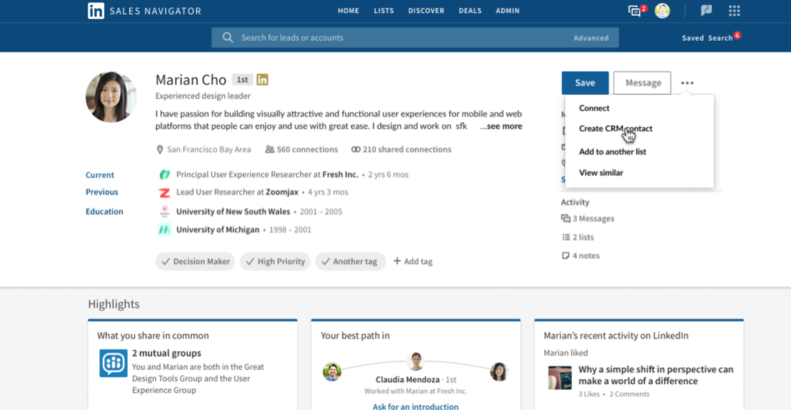
As mentioned above, Sales Navigator shows complete profiles of leads right on the screen which makes it easy to determine whether or not you want to connect with them and provides a simple way for you to send your connection request.

Once someone clicks on your name and accepts your invitation, they show up in the Leads section of Sales Navigator under “Connections.”

If you click on that link, you’ll be taken to a page that shows all your connections. It’s important to remember that there are different levels of connection within LinkedIn.

For example, someone may accept your invitation to connect on LinkedIn, but not share their email address with you so you still won’t have full access to the information in their profile.

Once you have a list of people in your system and they’ve accepted your connection invite, it’s important to develop a strategy for engaging with them.

This is the final step in the LinkedIn lead generation process – having a systematic way of connecting with your audience and turning them from leads to customers and from customers to sales.

In order to do this successfully, you’ll need to have a strategy in place that allows you to nurture your leads over time.

This could mean setting up email drip campaigns, sending them pieces of content they’re interested in, or developing an automated process for sharing valuable posts on social media sites like LinkedIn, Twitter, and Facebook.

For email, you will want to use something such as mail chimp or convert kit.

For tips on email marketing, you can see a previous post on we did on writing killer email campaigns.

Just remember, the most important thing is being genuine. At the end of the day, you’re trying to add real value and communicate in a way that will enrich your customer’s lives.

I can’t tell you how many times I am sent generic templates with no value that are asking me for something. Those never work. Stop wasting your time!

In addition, don’t just try to sell them something automatically or turn them into a source of revenue immediately. Instead, take your time and build an ongoing relationship with them so they know what they can expect from you and become loyal to your brand.

Once you have this process in place and it’s working efficiently, the last step is to scale!

The great thing about doing lead generation through LinkedIn is that all of these processes can be automated and scaled across a huge number of people simultaneously.

Using an email marketing tool like mail chimp or convertkit makes it easy to set up drip campaigns, Sales Navigator makes it easy to import leads into your system, and sharing content over social media is made simple by tools like CoSchedule.

The main thing to remember when scaling lead generation activities on LinkedIn is that you’re not just looking for high volume.

Since the whole process revolves around building an ongoing relationship, you’ll want to ensure that each lead you generate is nurtured to the point that they’re ready to become a customer.

Don’t build superficial or shallow relationships. That never leads to trust. Trust is what sells.

Once you have all of these pieces in place you’ll be set up for LinkedIn Lead Generation success! Now, it’s time to start generating your first round of leads and converting them into customers.

Happy Hunting!

Want more in-depth tips to scale your business fast and profitably? Smash that subscribe button below!